 Brainerce Help
Referral program
Members share a personal code, friends get a welcome coupon, and the referrer earns points after the friend's first order, with fraud protection built in.
⛔ You cannot set this up yet. Loyalty has not been released to stores, so there is no Loyalty entry in your sidebar and none of the screens below exist for you today. This describes how it will work once it ships. See what Brainerce does not do.
Referrals turn happy customers into a sales channel. A member shares a personal code; their friend gets a welcome discount at sign-up; the member earns points once the friend actually buys. Every step is automatic, and a fraud layer keeps it honest.
Turn it on
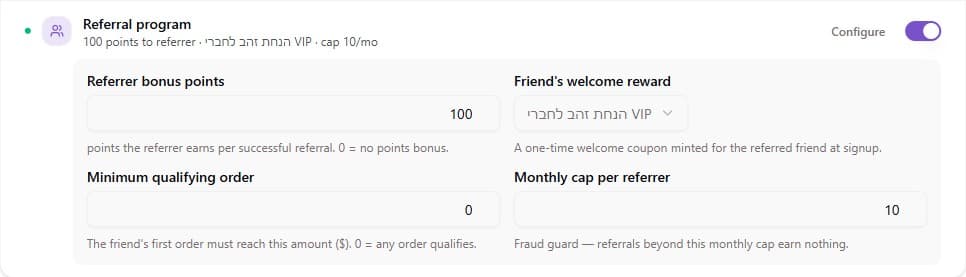
Open Customers → Loyalty → Settings → Engagement & growth → Referral program and configure:
| Setting | What it does |
|---|---|
| Referrer bonus points | Points the member earns per successful referral. 0 = no points (friend still gets their reward). |
| Friend's welcome reward | A reward from your catalog, minted as a one-time coupon for the friend the moment they sign up. |
| Minimum qualifying order | The friend's first order must reach this amount for the referrer to earn. 0 = any order counts. |
| Monthly cap per referrer | Fraud guard. Once a referrer hits this many referrals in a month, further ones are recorded as Rejected and earn nothing, and the friend gets no welcome coupon either (default 10). |
The row's live summary shows the whole configuration at a glance, for example "100 points to referrer · 10% off · cap 10/mo".
How a referral flows
- The member gets a share code, a personal
REF-XXXXXXXXcode, surfaced by your storefront (e.g. "Share your link, earn 100 points"). - The friend lands on your storefront via the shared link. The storefront can greet them by the referrer's first name, with "Rina sent you a gift: 10% off your first order", before they even sign up.
- The friend registers with the code. Their welcome coupon is minted instantly and works at checkout across your sales channels. It is locked to that friend, so passing the code on to somebody else does nothing. It can be used once, and it never expires: no end date is set and there is no field for you to add one, so an unclaimed welcome discount stays redeemable indefinitely. Set Minimum order on the welcome reward if you need to bound what it can eventually cost you.
- The friend places their first qualifying order. The referrer's bonus points are granted and held as pending through your return window, exactly like purchase points.
- If that order is cancelled or refunded, the referral is rejected and the referrer's bonus is taken back automatically.
Each customer can be referred once, ever, so repeat sign-ups with new codes don't earn anyone anything.
The Referrals tab
Customers → Loyalty → Referrals opens with a funnel (share codes issued → signed up → first order placed → flagged for review) that answers "is this working?" before you look at any row.
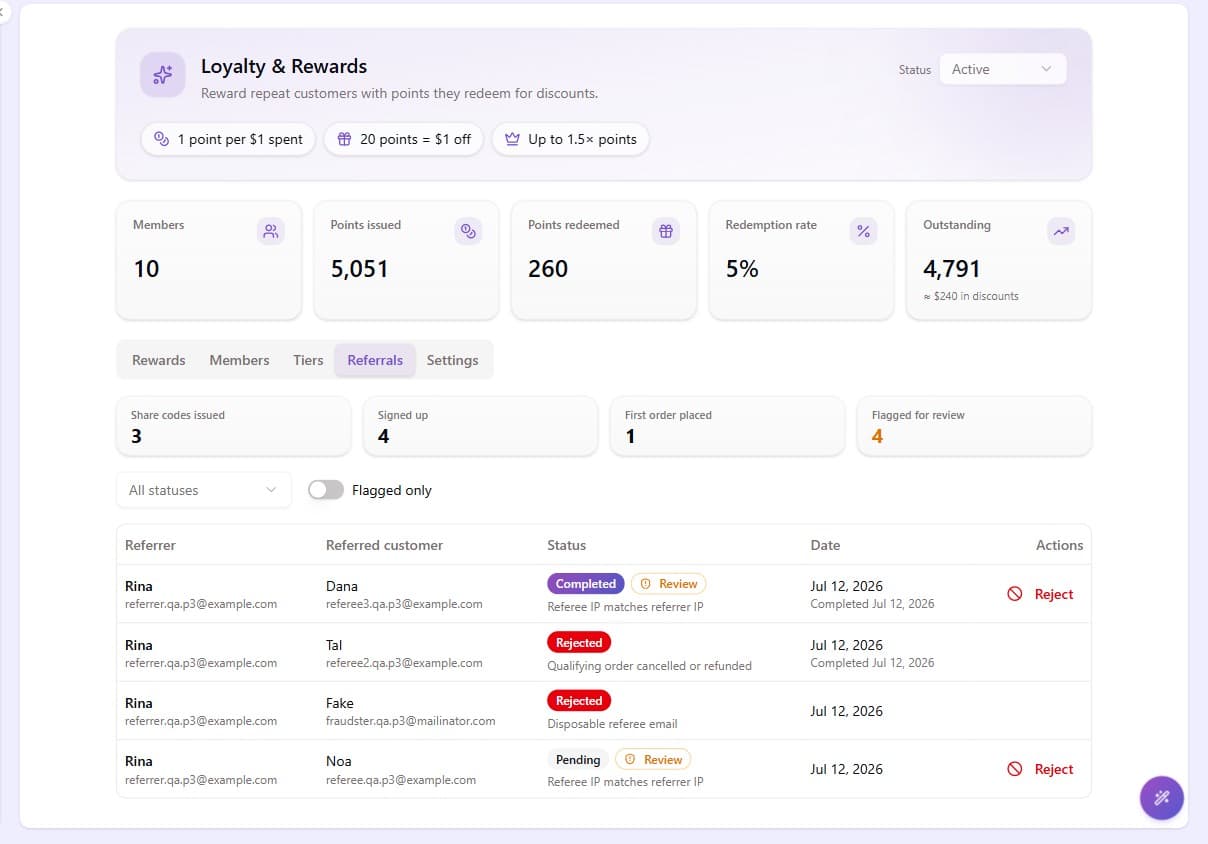
Below it, every referral with its status:
| Status | Meaning |
|---|---|
| Pending | The friend signed up but hasn't placed a qualifying order yet. |
| Completed | Qualifying order placed, and the referrer's bonus is granted. |
| Rejected | Blocked by a fraud rule, reversed after a cancellation, or rejected by you. The reason shows on the row. |
Fraud protection
Referral programs attract abuse, so several checks run silently on every sign-up:
- Disposable email addresses (mailinator-style throwaways) → the referral is rejected automatically, with the reason recorded. The friend's account is still created; only the referral is void.
- Email aliases of the referrer (e.g.
[email protected]referring[email protected]) → rejected automatically. - Same network address as the referrer → the referral is flagged for review, not blocked, because a shared household Wi-Fi is legitimate. Flagged referrals show a Review badge and complete normally unless you intervene.
- Monthly cap → once a referrer is over the cap, further referrals are recorded as Rejected so you can see them in the Referrals tab, but nobody is paid: no points for the referrer and no welcome coupon for the friend.
For anything the rules didn't catch, every referral row has a Reject button: it voids the referral and reverses the referrer's points if they were already granted, even confirmed ones.
Storefront requirement
The share-code surface and the referral landing greeting are rendered by your storefront using the loyalty SDK; sign-up just passes the code along. Send your developer to the integration guide. It's a small task with copy-paste snippets.